Downloading a cryptocurrency wallet from random third-party APK mirrors is one of the fastest ways to lose your funds, and search results for Cake Wallet APK are actively polluted with stale builds and unrelated clones. Sideloading the official Cake Wallet v6.5.4 build directly from Cake Labs’ GitHub releases or F-Droid repository gives you verifiable MIT-licensed self-custody for Monero, Bitcoin Lightning, Zcash, and 15+ additional networks with zero Google Play dependency.
arm64-v8a)cake-tech/cake_walletKey Takeaways
- Verified v6.5.4 Direct Sources Only: Pull
Cake_Wallet_v6.5.4-arm64-v8a.apk(128.79 MB) straight from GitHub or Cake Labs’ F-Droid repo to avoid APKMirror’s outdated v5.4.0 archive and APKPure’s unrelated 2022 BSC clone (finance.tresleches.cakewallet). - 206 MB Storage Savings with arm64-v8a: Choosing the architecture-specific
arm64-v8abinary over the 334.73 MB universal APK cuts download size by 61% while running natively on every modern 64-bit Android handset. - Major November 2026 Upgrades: Version 6.5.4 adds air-gapped Zcash QR signing via Cupcake v1.2.0, native Bitcoin Lightning via Spark and Breez SDK, Tron WalletConnect with USDT energy rental, Bitcoin Cash on Ledger, and instant cross-asset swaps without switching wallets.
Why Sideload Cake Wallet APK from GitHub or F-Droid Instead of Mirrors?
Sideloading Cake Wallet directly from Cake Labs’ official GitHub releases or F-Droid repository guarantees you run the current v6.5.4 release signed by the developers’ cryptographic key. Third-party APK aggregators frequently serve months-old builds or misindexed clone apps that expose private keys and fail signature checks.
During our November 2026 search audit for cake wallet apk download, two concrete mirror hazards stood out immediately. APKMirror’s public listing stalled at version 5.4.0 from September 2025, missing over a year of protocol upgrades, Monero and Zcash synchronization patches, and native Bitcoin Lightning support. Worse still, APKPure’s top-ranking result for “CakeWallet APK” actually distributes an abandoned 2022 BNB Smart Chain wallet under package ID finance.tresleches.cakewallet, which has zero affiliation with Cake Labs or the legitimate com.cakewallet.cake_wallet app.
Checking whether Cake Wallet is safe to use comes down to code transparency and key ownership. Cake Wallet is released under the permissive MIT open-source license on GitHub, holds zero custody of your recovery phrases, and keeps your Monero view key strictly on-device rather than uploading it to third-party scanning servers. Because every Android release publishes a PGP-signed SHA256SUMS manifest, you can mathematically confirm your binary matches the upstream build before entering a single word of a seed phrase. That verifiability is why Cake Wallet fits right alongside the vetted tools in our Best Open-Source Android Apps (FOSS) Guide.
If you prefer automatic store delivery, Cake Wallet remains available on the Google Play Store as well as iOS, macOS, Windows (.exe), and Linux (.flatpak and .tar.xz). However, sideloading the GitHub or official F-Droid APK eliminates Play Store billing wrappers, removes Google account tracking from your crypto tooling, and receives patches days ahead of store review queues.
Cake Wallet vs Alternatives: Monero.com, BlueWallet, and Unstoppable Wallet
Cake Wallet is the strongest all-round open-source Android wallet if you need privacy coins like Monero and Zcash alongside native Bitcoin Lightning and EVM networks in one interface. Single-chain specialists like Monero.com and BlueWallet offer smaller APK footprints when you strictly hold one asset.
Before installing, compare Cake Wallet v6.5.4 against its closest open-source Cake Wallet alternatives across binary size, verified upstream release status, Lightning architecture, and cold-storage pairing:
| Capability | Cake Wallet (v6.5.4) | Monero.com (v6.5.4) | BlueWallet (v8.0.2) | Unstoppable Wallet (v0.53.0) |
|---|---|---|---|---|
| License & Custody | MIT • Non-custodial | MIT • Non-custodial | MIT • Non-custodial | MIT • Non-custodial |
| Supported Networks | 18+ (XMR, BTC, ZEC, LTC MWEB, ETH, SOL, TRX, BCH, Base, Arbitrum, Polygon, BNB, DOGE, Nano, Zano, Decred) | Monero (XMR) only | Bitcoin (BTC) only | Multi-chain (BTC, ETH, EVM, SOL, ZEC, TON, TRON) |
| Monero (XMR) Support | Full local view key + subaddresses | Full local view key + subaddresses | No | No |
| Bitcoin Lightning | Native self-custodial (Spark / Breez SDK) | No | External LNDHub only | No |
| GitHub APK Size | 128.79 MB (arm64-v8a) | 71.59 MB (arm64-v8a) | 73.90 MB | 85.65 MB (GitHub flavor) |
| Official F-Droid Repo | Yes (fdroid.cakelabs.com) | Yes (fdroid.cakelabs.com) | No | No (GitHub releases) |
| Air-Gapped Cold Signing | Cupcake v1.2.0 QR (BTC, XMR, ZEC) + Hardware Wallets | Cupcake v1.2.0 QR + Ledger | PSBT / Coldcard / Keystone | Watch-only / WalletConnect |
If you strictly transact in Monero and want to trim 57 MB off your install size, Cake Labs maintains the sibling Monero.com APK from the exact same codebase (select Monero.com_v*-arm64-v8a.apk on the latest release page). Bitcoin-only power users focused on multisig vaults and custom PSBT hardware workflows should look at BlueWallet v8.0.2, whereas heavy DeFi traders needing native on-chain analytics across EVM chains without Monero can evaluate Unstoppable Wallet v0.53.0.
Step 1: Download and Verify the Official Cake Wallet APK
Download the architecture-matched Cake_Wallet_v*-arm64-v8a.apk directly from Cake Labs’ evergreen GitHub latest-release page and check its SHA-256 hash against the live PGP-signed SHA256SUMS manifest before tapping Install. This takes under 60 seconds and eliminates tampered binaries, downgrade attacks, and Play Store signature conflicts.
| Package Specification | Official Upstream Details |
|---|---|
| Application Name | Cake Wallet |
| Android Package ID | com.cakewallet.cake_wallet |
| Tested Baseline Release | v6.5.4 (Released November 15, 2026) |
| Minimum Android OS | Android 7.0 Nougat (API 24) • Target SDK 35 • Compile SDK 36 |
| License & Cost | MIT Open Source • Free (No wallet subscription fees) |
| Official Latest GitHub APK | Download Latest Cake Wallet APK on GitHub (Select arm64-v8a.apk) |
| All Release Archives | github.com/cake-tech/cake_wallet/releases |
| Official F-Droid Mirror | fdroid.cakelabs.com (https://fdroid.cakelabs.com/repo) |
| Tested Baseline SHA-256 (v6.5.4 arm64-v8a) | f9eee98888b432df7069e8756b8a6655767e467dfb2f7f5ebb4fa0b90d4cd2b4 |
| PGP Signing Fingerprint | 22F56E809E09444989AFA8E023FE05609FFB3E7C ([email protected]) |
Choose the Right Android APK Architecture (arm64-v8a vs Universal)
Every Cake Wallet GitHub release ships four Android APK variants on the official latest release page. Almost every Android phone sold since 2018 runs a 64-bit ARM processor and should use the arm64-v8a file rather than the bloated universal package (sizes and hashes below reflect our tested v6.5.4 baseline):
| APK Filename Pattern (Tested v6.5.4 Baseline) | File Size | Target Hardware | Tested v6.5.4 SHA-256 Checksum |
|---|---|---|---|
Cake_Wallet_v*-arm64-v8a.apk | 128.79 MB | Modern 64-bit Android phones (Pixel, Galaxy S/A, OnePlus, GrapheneOS) | f9eee98888b432df7069e8756b8a6655767e467dfb2f7f5ebb4fa0b90d4cd2b4 |
Cake_Wallet_v*-armeabi-v7a.apk | 123.02 MB | Older 32-bit budget Android devices | 333d944e31dc812aff34848519b3d262444d8998947e6b7149997a5f94b8917d |
Cake_Wallet_v*_4431.apk (Universal) | 334.73 MB | Universal fat APK (bundles arm64, armeabi-v7a, and x86_64 native libs) | 9bfdc47e23100c91fc43d29e49f6cf79e4f9b84e6cdff3f9b0fc3a9f0d5a2f99 |
Monero.com_v*-arm64-v8a.apk | 71.59 MB | 64-bit phones needing Monero (XMR) only | e98d483e499b28dde61ac49608de9023e05cf77be712da09b32ee02d7e85af09 |
Verify the SHA-256 Checksum and PGP Signature Before Installing
Before sideloading any crypto wallet binary onto a phone that will hold real funds, verify both the cryptographic signature and file hash against the live manifest for the version you downloaded. From the latest release assets list, download SHA256SUMS and SHA256SUMS.asc into the same folder as your APK on Linux, macOS, or Termux, then run:
# 1. Fetch Cake Labs' official release signing key
gpg --locate-keys [email protected]

# 2. Verify the manifest signature (confirm fingerprint: 22F56E809E09444989AFA8E023FE05609FFB3E7C)
gpg --verify SHA256SUMS.asc SHA256SUMS

# 3. Validate the APK hash against the signed manifest
sha256sum -c --ignore-missing SHA256SUMS
Confirm the terminal prints Good signature from "Omar Shibli <[email protected]>" and Cake_Wallet_v6.5.4-arm64-v8a.apk: OK. Full cross-platform verification commands are also documented in Cake Labs’ upstream VERIFY.md reference.
Once verified, open the APK file from your file manager to install it. On Samsung Galaxy handsets running One UI 8 or One UI 9, disable Auto Blocker temporarily under Settings > Security and privacy > Auto Blocker if the system blocks local APKs. On Android 16 and Android 17 devices enforcing Google’s unverified developer prompt or 24-hour sideload cooldown, follow our Android Unverified Developer Sideloading & ADB Install Guide to deploy the verified package cleanly over USB or wireless ADB using adb install Cake_Wallet_v6.5.4-arm64-v8a.apk.
Step 2: Configure Automatic Updates via F-Droid or Obtainium
Configure Cake Labs’ official F-Droid repository or Obtainium immediately after installing so security patches and protocol hard forks update automatically without manual APK hunting. Both methods pull the exact same developer-signed GitHub release artifacts and block unsigned third-party modifications.
Method A: Add Cake Labs’ Official F-Droid Repository (Droid-ify or F-Droid)
Users searching for cake wallet f droid often miss Cake Wallet in the default F-Droid catalog because Cake Labs distributes its binaries through its own self-hosted F-Droid repository. Pairing that mirror with a modern client from our Droid-ify APK F-Droid Client Guide indexes updates in seconds:
- Open Droid-ify (or the official F-Droid client) and navigate to Settings > Repositories.
- Tap the + button to add a custom repository and enter the official address:
https://fdroid.cakelabs.com/repo - Paste or cross-check the exact SHA-256 repository signing fingerprint before saving:
EA 44 EF AE E0 B6 41 EE 7A 03 2D 39 7D 5D 97 6F 9C 4E 5E 1E D2 6E 11 C7 57 02 D0 64 E5 5F 87 55 - Refresh the repository list, search for Cake Wallet, and confirm it matches your installed package (
com.cakewallet.cake_wallet).
Method B: Track GitHub Releases Directly with Obtainium
If you already track your FOSS apps straight from GitHub using our Obtainium APK GitHub Auto-Update Guide, add Cake Wallet with an explicit regex filter so Obtainium ignores the 335 MB universal package and the sibling Monero.com APK:
- Open Obtainium, tap Add App, and paste
https://github.com/cake-tech/cake_walletas the App Source URL. - Scroll to Filter APKs by Regular Expression and enter:
Cake_Wallet_.*arm64-v8a\.apk$ - Enable Verify latest tag and tap Add. Obtainium now checks GitHub releases on schedule and downloads only the 128 MB 64-bit binary.
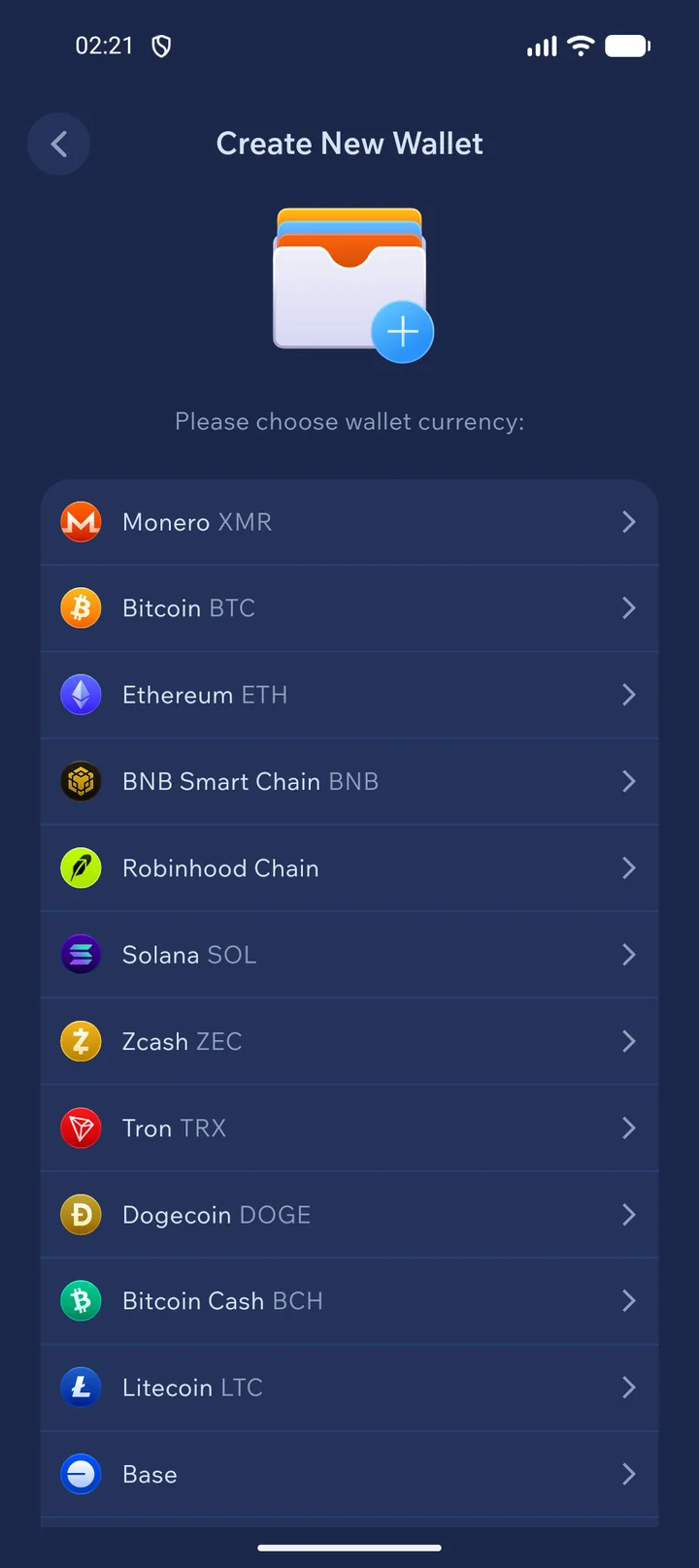
Step 3: Create Your Self-Custody Wallet (BIP-39 Groups, Polyseed, and Restore Height)
Creating your first wallet in Cake Wallet generates private keys locally on your device using either a 12-word BIP-39 multi-coin wallet group or Monero’s 16-word Polyseed standard. Write your recovery phrase and block restore height on physical paper or stamped steel offline, never in screenshots or cloud notes.
- Set an App PIN and Biometric Lock: On first launch, choose a 6-digit PIN (avoid 4-digit codes) and enable fingerprint or face authentication backed by Android’s hardware keystore.
- Pick Your Seed Standard (BIP-39 vs Polyseed): Cake Wallet supports BIP-39 wallet groups, which derive Bitcoin, Ethereum, Litecoin, Bitcoin Cash, Zcash, Solana, Tron, Polygon, Base, Arbitrum, and BNB Smart Chain wallets from one shared 12-word or 24-word BIP-39 seed. For Monero (XMR), Cake Wallet defaults to 16-word Polyseed (which embeds the wallet birthday directly inside the seed for fast recovery) while remaining backward-compatible with legacy 25-word Monero seeds.
- Record Your Restore Height: For Monero and shielded Zcash wallets, note the exact creation date or block height shown during setup. If you ever wipe your phone and restore from a legacy 25-word seed without that block height, the app has to scan the chain from genesis, adding hours to recovery.
- Lock Down the v6.5.4 Interface: Open Settings > Display to choose the dark navy or pure-black AMOLED theme and toggle off the Charts, Apps, or Show Buy/Sell options switches if you want a distraction-free transactional dashboard with fewer external price-feed queries.
Step 4: Privacy Hardening, Bitcoin Lightning, UK Revolut Ramp, and Cold Storage
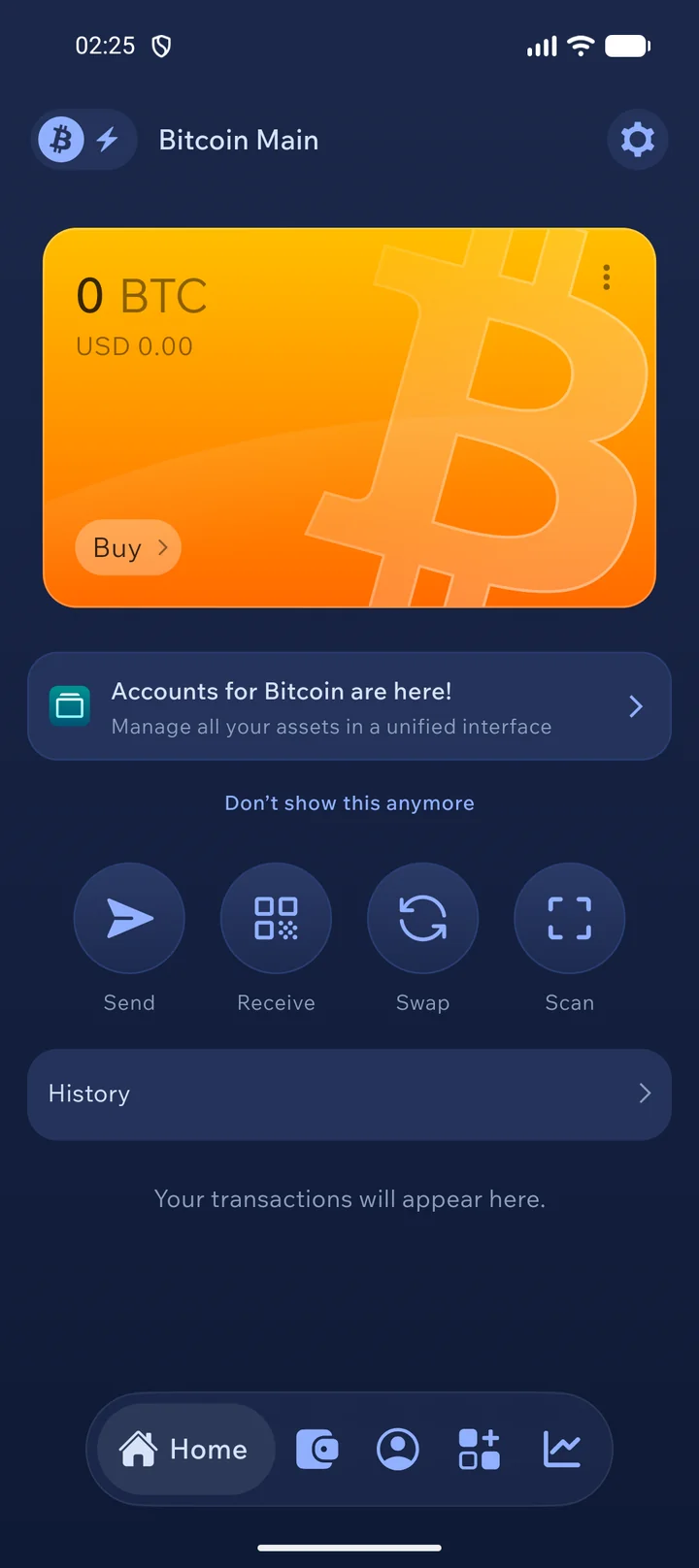
Out-of-the-box Cake Wallet settings balance convenience with privacy, but four targeted tweaks harden network metadata protection, activate instant Bitcoin Lightning payments, clarify UK Revolut fiat ramps, and isolate large balances inside hardware or air-gapped Cupcake cold storage.
Route Node Traffic Over Tor and Run Without Google Play Services
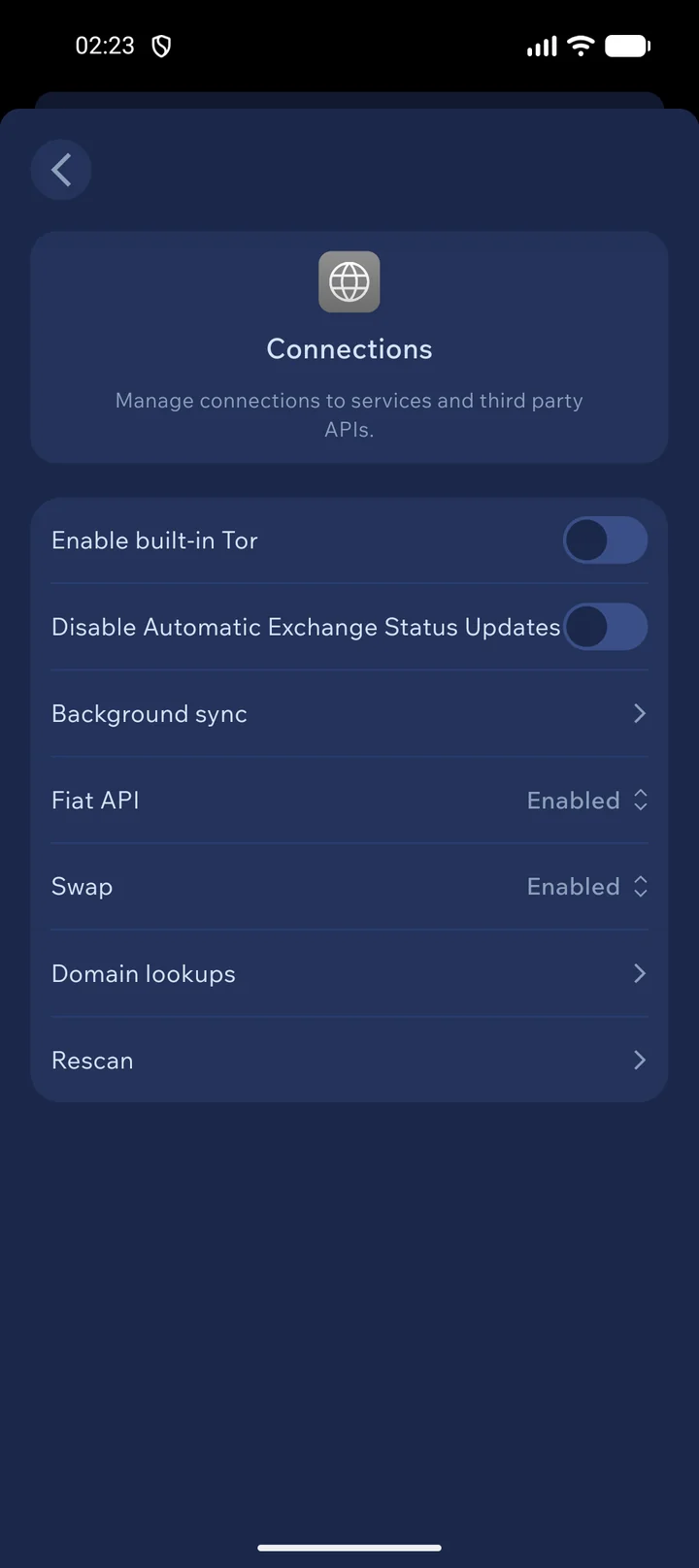
Every cryptocurrency wallet queries remote blockchain nodes to check balances and broadcast signed transactions, which can expose your home IP address to node operators. Inside Cake Wallet v6.5.4, open Settings > Connections to switch on Enable built-in Tor, toggle Disable Automatic Exchange Status Updates, or restrict Fiat API and Domain lookups. Next, check Settings > Privacy to confirm Auto generate subaddresses is enabled, and configure custom nodes or Orbot/I2P proxies under your per-coin settings if you run a self-hosted monerod or Electrum server.
Because the GitHub and F-Droid builds require zero Firebase or Google Play Services hooks, Cake Wallet runs natively on GrapheneOS and CalyxOS without Sandboxed Play Services. If you are building a dedicated privacy handset, pair this setup with our De-Google Android Guide to lock down background telemetry across the rest of your OS.
Enable Native Bitcoin Lightning (Spark / Breez SDK), Direct Swaps, and Tron Energy Rental
If you wondered is Cake Wallet Lightning capable, modern releases include native, self-custodial Bitcoin Lightning powered by Spark and the Breez SDK right inside your Bitcoin wallet. You do not open manual payment channels, manage inbound liquidity, or keep a routing node online 24/7. Activate Lightning inside your BTC wallet to claim a human-readable Lightning address (such as [email protected]) for sub-second invoices while keeping on-chain Bitcoin coin control and Silent Payments available on the same seed.
Version 6.5.4 also eliminates two major daily friction points. First, the built-in swap engine lets you convert between assets directly without manually switching active wallets first, adding the WhyNot exchange provider and expanded Chainflip cross-chain pairs. Second, Tron users gain direct WalletConnect dApp support plus Tron energy rental, letting you send USDT (TRC-20) without burning high TRX gas fees on every transfer.
UK Availability, Revolut Ramp, and Cake Pay Gift Cards
Readers frequently ask does Cake Wallet work in the UK and how Cake Wallet Revolut funding operates. Because Cake Wallet is pure self-custody software with no centralized account servers, the wallet works without geographic restriction in the UK for storing, receiving, sending, and swapping supported coins.
Fiat buying and selling, however, runs through regulated third-party ramp partners integrated inside the Buy/Sell menu, including Revolut Ramp for eligible UK and European users. Keep three UK realities in mind before initiating a GBP purchase: third-party ramps enforce identity verification (KYC) and UK FCA Travel Rule checks, some UK high-street banks block direct crypto debit-card MCC codes even when Revolut Ramp accepts Faster Payments or Revolut balance funding, and Monero (XMR) fiat pairs remain restricted by most UK-regulated payment rails. For everyday spending, Cake Pay (often searched as cake wallet card) lets you purchase digital merchant gift cards and prepaid vouchers directly using crypto balances inside the app, with merchant catalogs varying by country.
Pair Hardware Wallets or Air-Gapped Cupcake v1.2.0 Cold Storage
Treat a hot mobile wallet like physical pocket cash and move long-term holdings to cold storage. Cake Wallet connects directly to hardware signers including Ledger (now supporting Bitcoin Cash BCH in v6.5.4 alongside BTC, ETH, LTC, and XMR), Trezor, Coldcard, and Keystone. Before initializing any hardware device bought online, audit its tamper seals and firmware authenticity using the lessons from our Ledger Supply-Chain Hardware Breach Analysis.
If you own a spare factory-reset Android phone, you can also install Cake Labs’ open-source companion app Cupcake v1.2.0 (Cupcake_v1.2.0-arm64-v8a.apk) on the permanently offline device. Keep Wi-Fi, Bluetooth, and cellular radios disabled on the spare handset, pair it with Cake Wallet via animated QR codes, and sign Bitcoin, Monero, and now shielded Zcash (ZEC) transactions in v6.5.4 completely air-gapped.
Troubleshooting Common Cake Wallet Errors on Android
Most “Cake Wallet app not working” issues trace back to four fixable causes: Play Store versus GitHub signing conflicts, mismatched Monero or Zcash restore heights, throttled public nodes, or aggressive OEM battery killers. Work through the exact symptom below before reinstalling or wiping app data.
- “App not installed as package conflicts with an existing package” (
INSTALL_FAILED_UPDATE_INCOMPATIBLE): Google Play’s App Signing key differs from Cake Labs’ direct GitHub/F-Droid signing key, so Android blocks in-place upgrades across sources. Confirm your recovery phrases are written safely offline, uninstall the Play Store build completely, and installCake_Wallet_v6.5.4-arm64-v8a.apkcleanly. - Cake Wallet Blank Screen or Instant Crash on Launch: If you see a black screen or immediate force-close (
cake wallet blank screen/cake wallet app not opening), verify you installed thearm64-v8aAPK rather thanarmeabi-v7aon a 64-bit-only device like Pixel 7/8/9/10 series phones, which dropped 32-bit ARM support in hardware. If the ABI matches, open Android Settings > Apps > Cake Wallet > Storage and tap Clear cache (never Clear storage unless your seed backup is verified). - Synchronization Stuck or Missing Balance After Restore: Monero and Zcash balances show
0.00until blockchain scanning reaches the block containing your first deposit. Tap the sync status bar at the top, open Connection and sync > Manage nodes, switch to another green-latency node (or toggle Tor off momentarily to test connectivity), and trigger Reconnect / Rescan using a restore date set 7 days earlier than your first transaction. - Background Sync Killed on Samsung, Xiaomi, or OnePlus: Aggressive OEM power managers freeze Flutter isolates during long Monero or Zcash rescans. Exclude Cake Wallet from battery optimization under App info > Battery > Unrestricted (Samsung: remove from Deep sleeping apps) while syncing, and note that v6.5.4 lets you send transactions before full sync finishes on most UTXO and EVM wallets.
Self-Custody & Editorial Note: TechLoverHD publishes technical security and software setup guides, not financial or legal advice. Because Cake Wallet is strictly non-custodial, neither Cake Labs nor any third party can recover lost recovery phrases or reverse broadcast blockchain transactions.
Frequently Asked Questions
Is Cake Wallet safe to use, and is it completely free?
Yes. Cake Wallet is a free, MIT open-source, non-custodial wallet developed by Cake Labs where private keys and Monero view keys stay encrypted on your device. You pay zero subscription fees to hold, send, or receive funds, paying only standard blockchain network fees plus optional partner spreads if you use built-in swaps or fiat ramps.
Does Cake Wallet work in the UK with Revolut and bank cards?
Yes, the non-custodial Cake Wallet app works across the UK without geographic blocks for holding, sending, and receiving crypto. For GBP purchases, UK users can access integrated third-party rails like Revolut Ramp subject to partner KYC checks and UK FCA rules, while everyday spending is supported through Cake Pay digital gift cards.
Does Cake Wallet support Bitcoin Lightning Network and BIP-39 seed phrases?
Yes. Cake Wallet supports native self-custodial Bitcoin Lightning powered by Spark and the Breez SDK with zero manual channel management and readable @cake.cash Lightning addresses. It also uses standard 12-word or 24-word BIP-39 wallet groups across BTC, ETH, LTC, BCH, SOL, TRX, ZEC, and EVM networks, plus 16-word Polyseed for Monero.
Why is the GitHub arm64-v8a APK 128 MB while the universal APK is 335 MB?
The 334.73 MB universal APK bundles native C++ and Rust cryptographic libraries for three CPU architectures (arm64-v8a, armeabi-v7a, and x86_64) inside one archive. Downloading Cake_Wallet_v6.5.4-arm64-v8a.apk strips out unused architectures for modern 64-bit Android phones, saving 205.94 MB of storage with identical features.
Is the Crypto.com app or APKPure’s CakeWallet Smartchain app related to Cake Wallet?
No. Official Cake Wallet (com.cakewallet.cake_wallet) is an independent open-source app built by Cake Labs and has zero connection to Crypto.com. Likewise, APKPure’s legacy listing for finance.tresleches.cakewallet is an unrelated 2022 BNB Smart Chain project that you should never install if you want official Cake Wallet.
Can I run Cake Wallet on GrapheneOS or Android without Google Play Services?
Yes. Both the GitHub release APK and Cake Labs’ official F-Droid build operate with zero Google Play Services dependencies on GrapheneOS, CalyxOS, and LineageOS. Pair your install with Obtainium or Droid-ify and turn on built-in Tor routing to keep node queries off your ISP.
Leave a Reply