
Android’s biggest networking limitation for non-root users has always been its single VPN slot restriction. Because the Android operating system only allows one application to bind to the VpnService API at a time, power users have historically been forced into a frustrating compromise. You either ran a local firewall and ad blocker (like NetGuard or AdAway) or ran an encrypted WireGuard VPN tunnel. You could never run both simultaneously on an unrooted device.
RethinkDNS (celzero/rethink-app) completely eliminates this limitation. Completely free, open-source (GPL-3.0), and devoid of telemetry, RethinkDNS acts as an all-in-one local network supervisor. It combines a granular per-app firewall, an on-device DNS blocklist engine with over 190 selectable filter lists, and a multi-tunnel WireGuard client inside a single unified service. With the release of RethinkDNS v056 through v058 ("Lok 3"), the app delivers full Android 17 compatibility, a redesigned real-time traffic dashboard, and a 70% reduction in background battery drain. In this complete 2026 guide, we walk through installing RethinkDNS, locking down noisy apps, loading on-device blocklists, and chaining your existing WireGuard or Headscale VPN profiles inside it.
com.celzero.bravedns)Why RethinkDNS Outperforms Standard Android Firewalls & DNS Changers
Unlike basic Private DNS settings (dns.adguard.com) that apply a one-size-fits-all filter across your entire phone and offer zero visibility into which apps are phoning home, RethinkDNS provides deep packet-level control:
- Solves the Single VPN Slot Bottleneck: Import standard WireGuard
.conffiles directly into RethinkDNS’s Proxy module. Your traffic passes through RethinkDNS’s local app firewall and DNS blocker first, and permitted packets are then routed through your encrypted WireGuard tunnel. - On-Device Blocklists with Zero Cloud Latency: Download compact, memory-mapped blocklists (OISD, StevenBlack, HaGeZi, 1Hosts) directly to your phone’s storage. Blocked telemetry domains are dropped in sub-millisecond time before a network socket ever leaves your device.
- Granular Per-App Firewall Rules: Block specific apps from accessing Wi-Fi, Mobile Data, or both. You can also enforce global rules such as blocking background access when the screen is locked or quarantining newly installed packages.
- Split-Tunneling by Application: Route sensitive browser traffic through a commercial Mullvad or Proton WireGuard endpoint, route homelab apps through your self-hosted Headscale mesh VPN, and let local banking apps bypass the proxy entirely so they never trigger security flags.
Android Network Security Comparison Matrix
| Feature / Capability | RethinkDNS (v058) | NetGuard | Android Private DNS | Standalone WireGuard App |
|---|---|---|---|---|
| Per-App Firewall (Wi-Fi / Cell) | Yes (Granular + Lockdown) | Yes | No | No |
| On-Device DNS Blocklists | Yes (190+ Filter Lists) | Manual Hosts File Only | No (Remote Server Only) | No |
| Built-In WireGuard Client | Yes (Multi-Tunnel + Split) | No (SOCKS5 Only) | No | Yes |
| Real-Time Per-App Connection Log | Yes (Domain, IP, ASN, Country) | Paid Pro Feature | No | No |
| Packet Capture (.pcap) | Yes (Built-in with Auto-Stop) | Yes | No | No |
| License & Cost | 100% Free & Open-Source | Freemium | Built-in OS Feature | 100% Free & Open-Source |
Step 1: Download & Install the Official RethinkDNS APK
While RethinkDNS is available on F-Droid and the Google Play Store, F-Droid builds often lag several days behind upstream releases. For instant zero-day updates, install the official GitHub build or track it directly inside Obtainium APK:
- Visit the official celzero/rethink-app GitHub Releases Page or download directly via the official F-Droid package page. You can also track updates automatically by pasting the GitHub repository URL into Obtainium.
- Locate the latest stable release tag (
v0.5.8or newer). - Under Assets, download the architecture-specific APK for modern 64-bit devices (
rethink-70-arm64-v8a.apk) or the universal release package. - Open the downloaded file and install it. If this is your first time sideloading on Android 16 or 17, follow our guide to enable Unknown Sources and manage Samsung Auto Blocker.
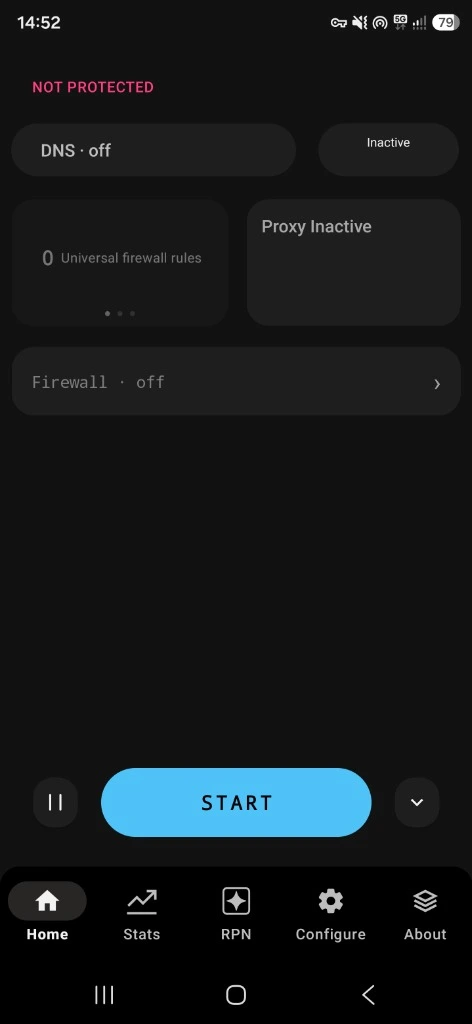
- Launch RethinkDNS and tap Start on the main dashboard, then tap OK on the Android system prompt to authorize the local VPN tunnel loopback.
Step 2: Configuring the Per-App Firewall & Universal Lockdown Rules
Even after you purge factory bloatware using our rootless Android debloating guide and sweep orphaned caches via SD Maid SE, many legitimate utilities (such as offline PDF readers, gallery apps, and third-party keyboards) have zero legitimate need to access the internet.
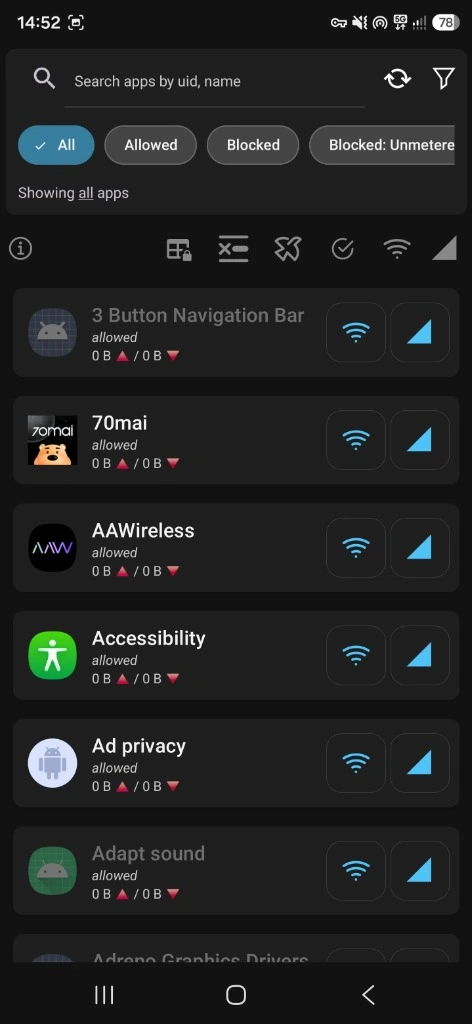
- From the RethinkDNS homescreen, tap Configure → Apps.
- Use the filter bar at the top to sort by Installed Apps or System Apps.
- Tap the Wi-Fi icon and Mobile Data icon next to any offline app (such as a calculator, local video player, or scanner) to turn them red, completely severing their network sockets.
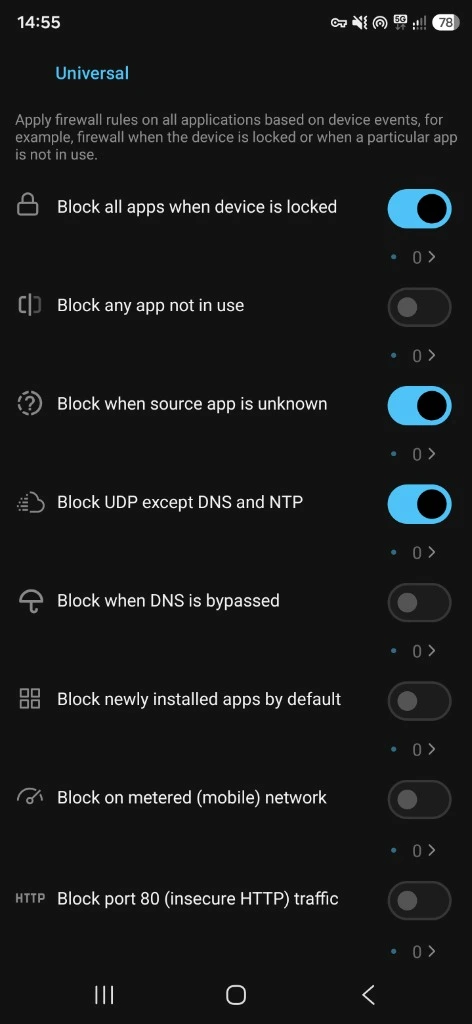
- Return to Configure → Firewall → Universal Firewall Rules and enable these high-impact toggles:
- Block when device is locked: Prevents background telemetry apps from syncing while your phone is idle in your pocket. Exempt messaging apps like Signal or WhatsApp by setting their individual app status to Bypass Universal.
- Block newly installed apps: Automatically quarantines any newly installed APK from accessing the internet until you explicitly approve it.
- Block port 80 (insecure HTTP) traffic: Forces applications to communicate over encrypted HTTPS and TLS or drops the connection immediately.
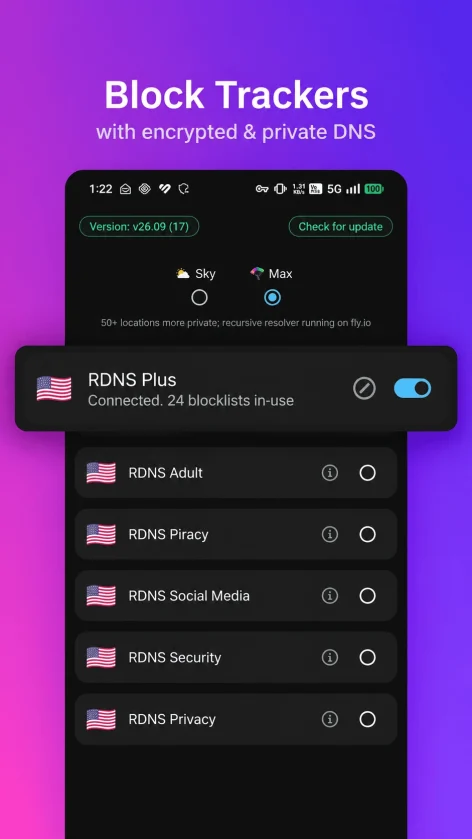
Step 3: Setting Up On-Device DNS Blocklists & Smart Presets
To strip out advertisements, behavioral trackers, and malicious domains at the DNS layer without sending DNS queries to third-party cloud servers:
- Navigate to Configure → DNS → On-device blocklists.
- Tap Download to fetch the latest compressed blocklist bundle directly onto your device storage (~35 MB).
- Once downloaded, tap Configure Blocklists and choose either:
- Simple View (Smart Presets): Introduced in
v057, you can toggle one-tap presets for Privacy (blocks trackers and analytics), Security (blocks phishing and malware domains), and Family (blocks adult content). - Advanced View (Custom Lists): Manually select high-reputation community lists. For an optimal balance of aggressive ad blocking with zero broken websites, enable HaGeZi Multi PRO or OISD Big alongside StevenBlack Unified.
- Next, go to Configure → DNS → Other DNS and select an encrypted upstream resolver using DNS-over-HTTPS (DoH) or DNS-over-TLS (DoT), including Quad9 (
9.9.9.9), Cloudflare (1.1.1.1), or ControlD. - Captive Portal Tip: Open Configure → DNS and toggle Use System DNS on Captive Portals to ON. This ensures hotel, airport, and train Wi-Fi login splash pages load instantly without pausing your DNS filter.
- Simple View (Smart Presets): Introduced in
Step 4: Chaining WireGuard VPN Tunnels Inside RethinkDNS
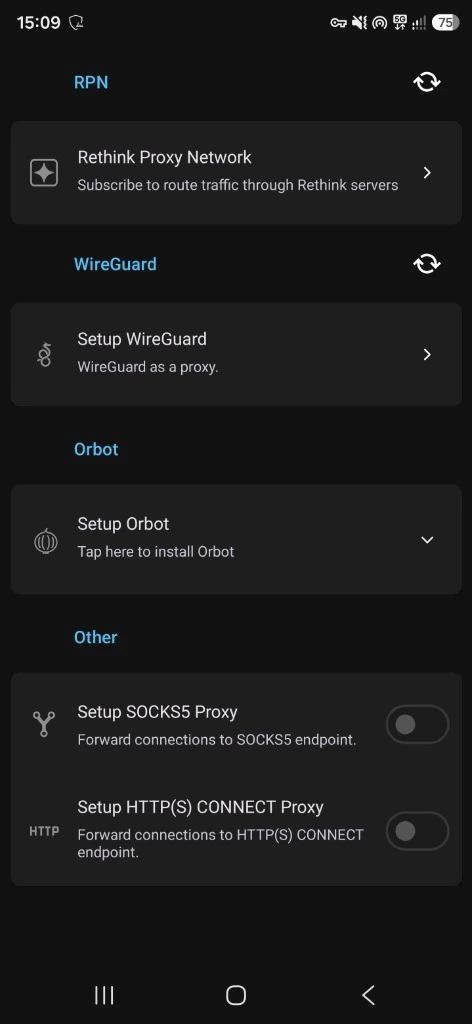
Here is how to run a full WireGuard VPN (such as Mullvad, ProtonVPN, IVPN, or your own self-hosted WireGuard server) simultaneously alongside RethinkDNS’s firewall and ad blocker:
- Export a standard WireGuard
.confconfiguration file from your VPN provider or your self-hosted server. - In RethinkDNS, navigate to Configure → Proxy → Setup WireGuard.
- Tap the + (Add) button in the bottom-right corner and select Import from file (or Scan QR Code).
- Select your
.conffile. Once imported, tap the configuration card to customize its routing behavior:- Simple Mode: Routes all non-blocked device traffic through this WireGuard tunnel.
- Advanced Mode (Split-Tunneling): Tap Add / Remove Apps inside the WireGuard profile to bind only specific apps (for example, Cromite browser, Tubular, or Seal) to that VPN tunnel, while letting the rest of your phone use your direct local connection for maximum speed.
- Toggle the switch on your WireGuard card to Active. The RethinkDNS homescreen banner will now update to read FIREWALL + DNS + PROXY.
Troubleshooting Common RethinkDNS Issues
Android Auto or Local LAN casting (Chromecast or LocalSend) stops working
Open Configure → Network and toggle Do not route Private IPs (192.168.x.x, 10.x.x.x, 100.64.x.x) to ON. Additionally, find Android Auto in Configure → Apps and set its rule to Exclude so it communicates directly with your vehicle’s head unit over local Wi-Fi Direct.
A specific website or in-app login refuses to load
Open the Logs tab from the RethinkDNS homescreen and look for red blocked entries triggered in the last ten seconds. Tap the blocked domain name and select Trust this domain (either globally or strictly for that single application).
RethinkDNS stops running in the background on aggressive OEM skins
Navigate to Android Settings → Connections → More connection settings → VPN, tap the gear icon next to Rethink, and toggle Always-on VPN to ON. In addition, set RethinkDNS’s battery profile to Unrestricted under App Info.
Frequently Asked Questions (FAQ)
Does RethinkDNS drain battery by running a local VPN 24/7?
No. RethinkDNS does not route your traffic through an external remote server unless you explicitly attach a WireGuard proxy tunnel. The local VpnService operates entirely inside your phone’s memory space, and the v058 update reduced background battery usage to roughly 2% to 3% over a full 24-hour cycle.
Can I automate RethinkDNS WireGuard tunnels when leaving home Wi-Fi?
Yes. Starting in RethinkDNS v058, you can broadcast Android intents from automation apps like Tasker or MacroDroid to automatically start, stop, pause, or resume specific Advanced-mode WireGuard tunnels whenever you disconnect from your trusted home Wi-Fi SSID.
Does RethinkDNS work on de-Googled phones?
Yes. The GitHub, Website, and F-Droid builds contain zero Google Play Services dependencies and zero proprietary crash-reporting frameworks, making it an ideal companion for devices running GrapheneOS Sandboxed Google Play or MicroG.
Final Thoughts
RethinkDNS is the ultimate networking utility for Android. By uniting per-app firewall controls, instant on-device DNS filtering, and multi-tunnel WireGuard routing under a single roof, it gives you desktop-grade visibility and control over every packet leaving your smartphone.
Want to take your Android privacy stack even further? Pair RethinkDNS with our curated 2026 Open-Source Android App Stack, automate your GitHub app updates via Obtainium APK, or unlock elevated system tweaks without root using our Shizuku Wireless Debugging Guide.
Leave a Reply