The official YouTube app for Android (com.google.android.youtube) is pre-installed on nearly every certified smartphone and tablet, handling 4K 60FPS HDR streaming, live broadcasts, and background cast controls. While Google normally rolls out updates automatically through the Play Store, millions of users need to manually download and install the YouTube APK to bypass staged regional rollouts, fix a broken Play Store update, downgrade to a clean build for patching, or restore video playback on older Android 5.1 through Android 8.0 hardware.
In 2026, sideloading the YouTube APK requires avoiding three common traps: downloading un-installable Split APK bundles (.apkm), hitting Android’s system-partition version downgrade block, and getting locked out by Google’s InnerTube API server block on older Android 5.0 to 7.1 phones. In this updated 2026 master guide, we cover downloading the latest verified YouTube v21.43.x APK, matching the exact working version for legacy Android OS releases, replacing the discontinued YouTube Go app, and unlocking ad-free background audio and offline MP4 downloads.
arm64-v8a, nodpi)Key Takeaways
- Latest 2026 Mainline APK: Official YouTube
v21.43.523requires Android 10.0+ (API 29). Always choose the standaloneAPK (nodpi)package (~201.2 MB) instead of theBUNDLE(.apkm) file so it installs natively without third-party split installers. - Working Fix for Android 5.0, 5.1.1, 6.0 & 7.1: Google’s InnerTube servers permanently disabled older official YouTube APKs (
v5.1.10,v5.2.27,v5.3.32,v5.5.27, up tov17.x), forcing an unskippable update screen. To watch YouTube on Android 5.0 to 7.1 in 2026, use Tubular, NewPipe, or RVX Android 6/7 (v17.34.36). - Best YouTube Go & Downloader Replacement: Since Google shut down YouTube Go, combine NewPipe (~11 MB APK with data-saver bitrate selection) and Seal APK (
yt-dlp) to save real MP4 videos and MP3/Opus audio directly to your SD card.
YouTube APK Version & Android OS Compatibility Matrix (Android 2.3 to Android 17)
Before downloading an installer package, verify both your phone’s Android OS version and whether Google’s InnerTube streaming servers still accept API handshakes from that client branch. Use the verified 2026 compatibility matrix below to choose the exact build that works on your device:
| Android OS Version | Final / Latest Official YouTube APK | 2026 InnerTube Server Status | Best Working Solution in 2026 |
|---|---|---|---|
| Android 10 to Android 17 (API 29 to 37) | v21.43.523 (Oct 2026 Latest, 201.2 MB) | 100% Active (arm64-v8a & armeabi-v7a) | Official Standalone APK or ReVanced Manager + GmsCore |
| Android 9.0 Pie (API 28) | v21.23.486 (Final Android 9 branch) | Active | Official v21.23.486 APK or NewPipe (FOSS) |
| Android 8.0 & 8.1 Oreo (API 26 to 27) | v20.06.38 / v20.06.39 (Final Oreo branch, 148 MB) | Active (Legacy API tier) | Official v20.06.38 APK or NewPipe / PipePipe |
| Android 6.0 & 7.1 (Marshmallow / Nougat) | v17.27.36 (Final API 23/24 official build) | Blocked by Server (Forces Update Screen) | NewPipe / PipePipe or RVX Spoofed (v17.34.36) |
| Android 5.0 & 5.1.1 (Lollipop, API 21 to 22) | v16.38.39 (Final Lollipop build, 17.5 MB) | Blocked by Server (Forces Update Screen) | NewPipe Legacy or Browser PWA in Cromite |
| Android 2.3 to 4.4 (Gingerbread / KitKat) | v10.49.59 (KitKat) / v5.1.10 to v5.6.32 (Android 2.3+) | Retired (API v2/v3 Legacy Disabled) | Download MP4 videos via Seal APK (yt-dlp) |
Legacy YouTube APK Version Archive (Android 2.3 to 7.1 Historical Builds)
If you are searching for historical YouTube APK builds such as v5.5.27, v5.8.52, v8.05.27, v10.49.59, or v16.38.39 for retro hardware preservation or offline testing, you can download verified original packages from the APKMirror historical vault. Keep in mind that because Google permanently retired InnerTube streaming support for client versions prior to v19.x, official legacy APKs will display a server update prompt unless patched:
| Target Android OS | Historical APK Release | APK File Size | Archival Download Mirror |
|---|---|---|---|
| Android 7.0 & 7.1 Nougat | YouTube v17.27.36 (nodpi) | ~45.8 MB | APKMirror v17.27.36 |
| Android 5.0 & 5.1.1 Lollipop | YouTube v16.38.39 (nodpi) | ~17.5 MB | APKMirror v16.38.39 |
| Android 4.4 KitKat | YouTube v10.49.59 (nodpi) | ~11.2 MB | APKMirror v10.49.59 |
| Android 4.0.3 to 4.3 Jelly Bean | YouTube v8.05.27 / v5.8.52 | ~8.9 MB | APKMirror Vault Archive |
| Android 2.3 Gingerbread | YouTube v5.5.27 / v5.1.10 | ~7.4 MB | APKMirror v5.5.27 |
Step 1: How to Download & Install the Official YouTube APK Safely
To manually update or reinstall the official YouTube app on Android 8.0 through Android 17, download the cryptographically signed standalone APK from a verified archive that checks Google LLC’s original hardware release key.
| Specification Metric | Verified Details (October 2026) |
|---|---|
| App Name & Package ID | YouTube by Google LLC (com.google.android.youtube) |
| Latest Verified Version | v21.43.523 (Version Code: 1561307650) |
| Minimum Android OS | Android 10.0+ (API 29 to Android 17) · See table above for Android 5.0 to 9.0 |
| Supported Architectures | arm64-v8a, armeabi-v7a, x86_64 (nodpi, 201.2 MB) |
| Google Signing Certificate (SHA-1) | 24:BB:24:C0:5E:47:E0:AE:FA:68:A5:8A:76:61:79:D9:B6:13:A6:00 |
| Official Verified Mirrors | Download on APKMirror · APKPure Verified |
- Check Built-In Store Updates First: If your device runs Google Play Services, open the Play Store, tap your top-right profile icon, and navigate to Manage apps & device → Updates available. If your store is stuck on “Pending…” or failing to install updates, follow our guide to update or repair the Google Play Store APK.
- Pick the Standalone
APKVariant (AvoidBUNDLE): On APKMirror’s release page forv21.43.523, you will see several rows markedBUNDLE(split.apkmarchives) alongside two rows marked with a solidAPKbadge. Always download the standaloneAPK(nodpi) build matching your processor (arm64-v8afor modern 64-bit phones, orarmeabi-v7afor older 32-bit devices). - Grant Sideloading Permission: Tap the downloaded
.apkfile in your browser or file manager. If this is your first time sideloading on Android 16/17 or Samsung One UI, follow our guide on how to enable Install Unknown Apps and unlock Samsung Auto Blocker. - Tap Update: Confirm the installation prompt. Your existing subscriptions, playlists, and Google account session remain intact.
Step 2: How to Downgrade YouTube APK Without “Package Invalid” Errors
Downgrading the YouTube app to an older version requires stripping out installed Play Store updates via Android App Info first, because Android forbids installing an older version code directly on top of a newer installed build. This step is mandatory if a brand-new 2026 update introduces playback bugs on your phone or if you need to install the exact target APK version required by ReVanced Manager.
- Open your phone’s Settings app and navigate to Apps → YouTube.
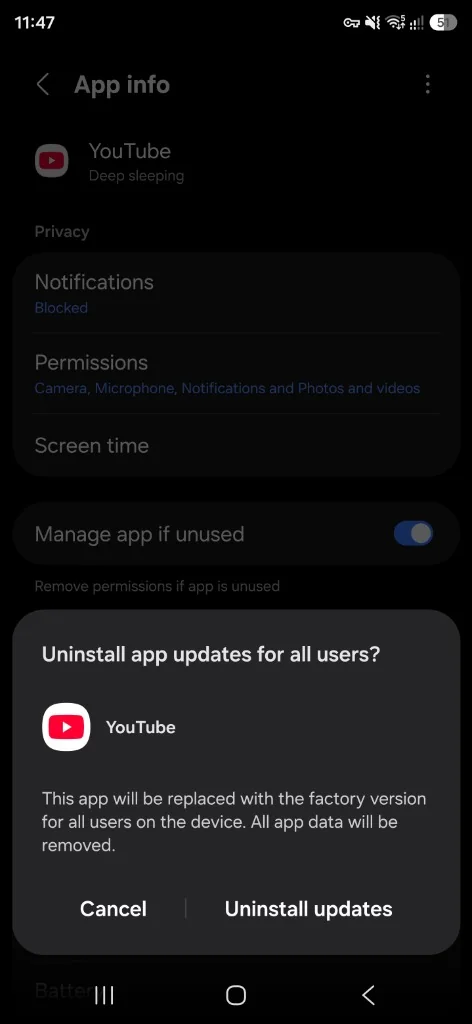
- Tap the three-dot menu (⋮) in the top-right corner of the App Info screen and select Uninstall updates.
- Tap Uninstall updates when prompted with “Uninstall app updates for all users? This app will be replaced with the factory version for all users on the device.” Android removes all Play Store updates from your user partition and resets YouTube to the older factory stub embedded in your system partition.
- Before installing your target APK, open the Google Play Store, search for YouTube, tap the three-dot menu (⋮) in the top-right corner, and uncheck Enable auto-update so Google Play does not overwrite your custom version overnight.
- Now open your downloaded YouTube
.apkfile and tap Update.
What Replaced YouTube Go & Legacy YouTube APKs in 2026? (Android 5.0 to 17)
If you are searching for YouTube Go APK, YouTube APK for Android 5.1.1 Lollipop, or legacy builds like v5.1.10, v5.2.27, v5.3.32, v5.5.27, and v5.6.32, installing those old Google APKs today will result in an immediate connection error. Google shut down the YouTube Go backend and blocked pre-v19 client versions on its InnerTube servers.
Depending on what you need (ad-free background audio, offline MP4/MP3 downloading to an SD card, or watching videos on an older Android 5.0 to 7.1 device), here is how the modern 2026 alternatives compare:
| Feature / Use Case | Official YouTube APK (v21.43.x) | YouTube ReVanced (Patched Official UI) | NewPipe / PipePipe (Best YouTube Go Replacement) | Seal APK (Best Video & Audio Downloader) |
|---|---|---|---|---|
| APK Download Size | 201.2 MB | ~195 MB | ~10 MB (Ultra-Lightweight) | ~28 MB (Includes yt-dlp + ffmpeg) |
| Blocks All Video & Feed Ads? | No (Requires Paid Premium) | Yes (100% Ad-Free) | Yes (100% Ad-Free) | N/A (Direct Media Extractor) |
| Background & Screen-Off Audio? | Paid Premium Only | Yes (Free) | Yes (Free + Queue Player) | Saves Local MP3 / FLAC / Opus |
| SponsorBlock Segment Skipping? | No | Built-In Automatic Skip | Built-In Automatic Skip | Slices Sponsors Out of Saved Files |
| Offline MP4 / SD Card Downloads? | Locked in Encrypted Cache | Hooks into Seal Button | Yes (Shows Exact MB File Size Like YouTube Go!) | Yes (144p up to 4K/8K 60FPS + Subtitles) |
| Requires Google Play Services? | Yes (Mandatory) | Uses Sandboxed GmsCore | No (Works on Huawei, Fire Tablets & Custom ROMs) | No (100% Standalone FOSS) |
1. Best Replacement for YouTube Go & Older Android Phones: NewPipe & PipePipe
If you loved YouTube Go because it ran fast on 1 GB to 2 GB RAM phones, let you preview the exact megabyte size of a video before streaming on mobile data, and saved videos directly to your microSD card, install NewPipe and PipePipe (featured in our 2026 Open-Source Android App Stack). PipePipe is an actively maintained client with built-in SponsorBlock and Return YouTube Dislike, while NewPipe provides an ultra-lightweight 11 MB footprint. Both require zero Google Play Services, and can be auto-updated straight from GitHub using Obtainium APK.
2. Best Offline YouTube Video & Audio Downloader APK: Seal (`yt-dlp`)
Most websites claiming to offer a “YouTube Downloader APK” (such as Snaptube, TubeMate, or VidMate) are packed with intrusive full-screen adware and background trackers. For a clean, 100% open-source downloader powered by the industry-standard yt-dlp and ffmpeg engines, follow our Seal APK Android Setup Guide. You simply tap Share → Seal inside any video to save permanent MP4/MKV videos or high-bitrate MP3/FLAC music files with embedded album art.
3. Best Way to Get Ad-Free YouTube & Background Play on Android 10 to 17: ReVanced Manager
If you want the exact look, feel, algorithmic recommendations, and Google Account login of the official YouTube app, but with zero ads, SponsorBlock, Return YouTube Dislike, and free background audio playback, follow our ReVanced Manager APK & GmsCore Setup Guide. It patches the official YouTube APK locally on your phone without requiring root access.
Troubleshooting Common YouTube APK Errors
“Switch to youtube.com
This version of YouTube is out of date” (Android 5.0, 6.0 & 7.1):
- Cause: Google permanently retired InnerTube server support for legacy YouTube client versions
v5.xthroughv17.x.
Fix
On Android 8.0 Oreo, install v20.06.38. On Android 5.0 Lollipop, Android 6.0 Marshmallow, or Android 7.0 Nougat where newer official builds cannot install, install NewPipe or open m.youtube.com inside an ad-blocking browser like Cromite.
“App not installed as package appears to be invalid” When Sideloading
- Cause 1: You downloaded a
.apkmor.xapksplit bundle instead of a standalone.apkfile.
Cause 2
You are attempting to install an older version (e.g., v20.40.45) while a newer version (v21.43.523) is already installed. Follow Step 2 above to run Uninstall updates in App Info first.
Cause 3
Your phone runs a 32-bit processor (armeabi-v7a) or an older Android OS version below Android 10, and you downloaded the 64-bit arm64-v8a Android 10+ APK.
YouTube Freezes, Lags, or Eats Gigabytes of Storage
- Fix: The YouTube app aggressively caches video chunks and Shorts previews. Open Settings → Apps → YouTube → Storage and tap Clear cache, or automate weekly cache purging across all apps using our SD Maid SE & Shizuku Cleaning Guide.
Frequently Asked Questions (FAQ)
Why can’t I completely uninstall the YouTube app on my Android phone?
Google requires certified Android manufacturers to embed the YouTube application stub inside the read-only system partition, which replaces the standard “Uninstall” button with “Disable”. If you want to completely remove the stock YouTube package for your user profile without root access, follow our Rootless Android Debloating Guide using Canta and Shizuku.
Is YouTube Go APK still working in 2026?
No, Google permanently shut down the YouTube Go servers, so any old YouTube Go APK downloaded today will fail to load videos. The best lightweight 2026 replacement is NewPipe (~11 MB) or PipePipe (~31 MB), which is only 10 MB, lets you choose low-data video resolutions (144p to 4K), and downloads MP4 videos and audio directly to your phone or SD card for offline playback.
How do I run YouTube on a Huawei phone, Amazon Fire Tablet, or de-Googled Android?
The stock YouTube APK crashes on devices without Google Play Services. To watch YouTube on Huawei HarmonyOS/EMUI, Fire OS, or custom ROMs, either install NewPipe or PipePipe (which require zero Google services) or pair a patched YouTube build with ReVanced GmsCore / MicroG.
Can I install this YouTube APK on Android TV or Fire Stick?
No, you should not install the standard mobile YouTube APK on a smart television or streaming stick. The mobile package (com.google.android.youtube) is designed strictly for touchscreens, will not respond properly to a directional TV remote, and fails to display a leanback banner in Android TV or Fire OS launchers. For smart TVs, install the dedicated YouTube for Android TV APK (com.google.android.youtube.tv) or the open-source SmartTube APK, which features native 4K 60FPS AV1 playback, remote D-pad controls, and built-in SponsorBlock.
Is there an official YouTube Lite APK under 30 MB?
No, Google does not offer an official YouTube Lite application. The only lightweight mobile client Google ever built was YouTube Go, which was permanently shut down. With the standard YouTube APK exceeding 200 MB and rapidly accumulating gigabytes of cached video chunks, the best lightweight options under 30 MB are NewPipe (~11 MB) and PipePipe (~31 MB). Both clients stream smoothly without Google Play Services, require minimal system RAM, and can download media locally to an SD card.
Final Thoughts
Whether you need the latest 2026 YouTube v21.43.523 standalone APK for a flagship smartphone, a clean version rollback via Uninstall updates, or a lightweight YouTube Go replacement for an older Android 5.1 to 8.0 device, matching the right tool to your hardware eliminates playback errors immediately.
Ready to get more out of YouTube on Android? Follow our step-by-step tutorial on patching YouTube safely with ReVanced Manager APK & GmsCore, download 4K videos and lossless audio offline with Seal APK (yt-dlp), or speed up a sluggish device with our 9 Proven Android Performance Fixes.
Comments
One response to “How to Download & Update YouTube APK on Android (2026 Guide)”