Clear App Cache and Corrupted Local Data
- If Facebook freezes on login, go to Settings → Apps → Facebook → Storage. Tap Clear cache, then tap Clear data. This resets the local database without affecting your cloud profile.
Frequently Asked Questions (FAQ)
Is downloading the Facebook APK safe for my Android device?
Yes, provided you download unmodified APK files signed by Meta Platforms, Inc. Android’s internal package manager checks the cryptographic certificate on the APK against Meta’s official public key. Never download modified APKs claiming to offer “unlimited credits” or “free VIP features”, as these frequently bundle malware.
Will sideloaded Facebook APKs update automatically?
Yes. As demonstrated above, Facebook includes an internal app updater service. As long as you keep Auto-update Facebook enabled inside App Update Settings, the app will download and apply new releases over Wi-Fi without requiring Google Play Store access.
How do I restore the Google Play Store if it is missing?
If you prefer using Google Play rather than manual sideloading, follow our comprehensive tutorial on How to Download & Update Google Play Store APK to restore the official store on your phone or tablet.
Final Thoughts
Sideloading the Facebook APK gives you full control over your social media client. Whether you run the latest v584.x mainline build on modern hardware, switch to Facebook Lite for a fast and lightweight experience, or install a verified legacy version on an older Android 5.0 tablet, managing your setup takes only a few taps.
Want to optimize your Android experience even further? Explore our guides on auto-updating apps directly with Obtainium APK, blocking tracking with our 2026 Open-Source Android App Stack, or removing OEM bloatware without PC or root access.
Facebook Crashes on Android 5.0 or 5.1 Lollipop
- Modern Facebook builds require Android 10+. If you are running an older device, download the archival Facebook v34.0.0 APK for Android 5.0 Lollipop.
Clear App Cache and Corrupted Local Data
- If Facebook freezes on login, go to Settings → Apps → Facebook → Storage. Tap Clear cache, then tap Clear data. This resets the local database without affecting your cloud profile.
Frequently Asked Questions (FAQ)
Is downloading the Facebook APK safe for my Android device?
Yes, provided you download unmodified APK files signed by Meta Platforms, Inc. Android’s internal package manager checks the cryptographic certificate on the APK against Meta’s official public key. Never download modified APKs claiming to offer “unlimited credits” or “free VIP features”, as these frequently bundle malware.
Will sideloaded Facebook APKs update automatically?
Yes. As demonstrated above, Facebook includes an internal app updater service. As long as you keep Auto-update Facebook enabled inside App Update Settings, the app will download and apply new releases over Wi-Fi without requiring Google Play Store access.
How do I restore the Google Play Store if it is missing?
If you prefer using Google Play rather than manual sideloading, follow our comprehensive tutorial on How to Download & Update Google Play Store APK to restore the official store on your phone or tablet.
Final Thoughts
Sideloading the Facebook APK gives you full control over your social media client. Whether you run the latest v584.x mainline build on modern hardware, switch to Facebook Lite for a fast and lightweight experience, or install a verified legacy version on an older Android 5.0 tablet, managing your setup takes only a few taps.
Want to optimize your Android experience even further? Explore our guides on auto-updating apps directly with Obtainium APK, blocking tracking with our 2026 Open-Source Android App Stack, or removing OEM bloatware without PC or root access.
- This error occurs when your phone has a pre-installed factory build of Facebook (often placed on system partitions by OEMs like Samsung or carrier bloatware).
Facebook Crashes on Android 5.0 or 5.1 Lollipop
- Modern Facebook builds require Android 10+. If you are running an older device, download the archival Facebook v34.0.0 APK for Android 5.0 Lollipop.
Clear App Cache and Corrupted Local Data
- If Facebook freezes on login, go to Settings → Apps → Facebook → Storage. Tap Clear cache, then tap Clear data. This resets the local database without affecting your cloud profile.
Frequently Asked Questions (FAQ)
Is downloading the Facebook APK safe for my Android device?
Yes, provided you download unmodified APK files signed by Meta Platforms, Inc. Android’s internal package manager checks the cryptographic certificate on the APK against Meta’s official public key. Never download modified APKs claiming to offer “unlimited credits” or “free VIP features”, as these frequently bundle malware.
Will sideloaded Facebook APKs update automatically?
Yes. As demonstrated above, Facebook includes an internal app updater service. As long as you keep Auto-update Facebook enabled inside App Update Settings, the app will download and apply new releases over Wi-Fi without requiring Google Play Store access.
How do I restore the Google Play Store if it is missing?
If you prefer using Google Play rather than manual sideloading, follow our comprehensive tutorial on How to Download & Update Google Play Store APK to restore the official store on your phone or tablet.
Final Thoughts
Sideloading the Facebook APK gives you full control over your social media client. Whether you run the latest v584.x mainline build on modern hardware, switch to Facebook Lite for a fast and lightweight experience, or install a verified legacy version on an older Android 5.0 tablet, managing your setup takes only a few taps.
Want to optimize your Android experience even further? Explore our guides on auto-updating apps directly with Obtainium APK, blocking tracking with our 2026 Open-Source Android App Stack, or removing OEM bloatware without PC or root access.
Troubleshooting Common Facebook APK Installation & Crash Errors
If you encounter errors during installation or the app closes immediately after launch, follow this diagnostic sequence:
“App Not Installed
Package Conflicted with an Existing Package”:
- This error occurs when your phone has a pre-installed factory build of Facebook (often placed on system partitions by OEMs like Samsung or carrier bloatware).
Facebook Crashes on Android 5.0 or 5.1 Lollipop
- Modern Facebook builds require Android 10+. If you are running an older device, download the archival Facebook v34.0.0 APK for Android 5.0 Lollipop.
Clear App Cache and Corrupted Local Data
- If Facebook freezes on login, go to Settings → Apps → Facebook → Storage. Tap Clear cache, then tap Clear data. This resets the local database without affecting your cloud profile.
Frequently Asked Questions (FAQ)
Is downloading the Facebook APK safe for my Android device?
Yes, provided you download unmodified APK files signed by Meta Platforms, Inc. Android’s internal package manager checks the cryptographic certificate on the APK against Meta’s official public key. Never download modified APKs claiming to offer “unlimited credits” or “free VIP features”, as these frequently bundle malware.
Will sideloaded Facebook APKs update automatically?
Yes. As demonstrated above, Facebook includes an internal app updater service. As long as you keep Auto-update Facebook enabled inside App Update Settings, the app will download and apply new releases over Wi-Fi without requiring Google Play Store access.
How do I restore the Google Play Store if it is missing?
If you prefer using Google Play rather than manual sideloading, follow our comprehensive tutorial on How to Download & Update Google Play Store APK to restore the official store on your phone or tablet.
Final Thoughts
Sideloading the Facebook APK gives you full control over your social media client. Whether you run the latest v584.x mainline build on modern hardware, switch to Facebook Lite for a fast and lightweight experience, or install a verified legacy version on an older Android 5.0 tablet, managing your setup takes only a few taps.
Want to optimize your Android experience even further? Explore our guides on auto-updating apps directly with Obtainium APK, blocking tracking with our 2026 Open-Source Android App Stack, or removing OEM bloatware without PC or root access.
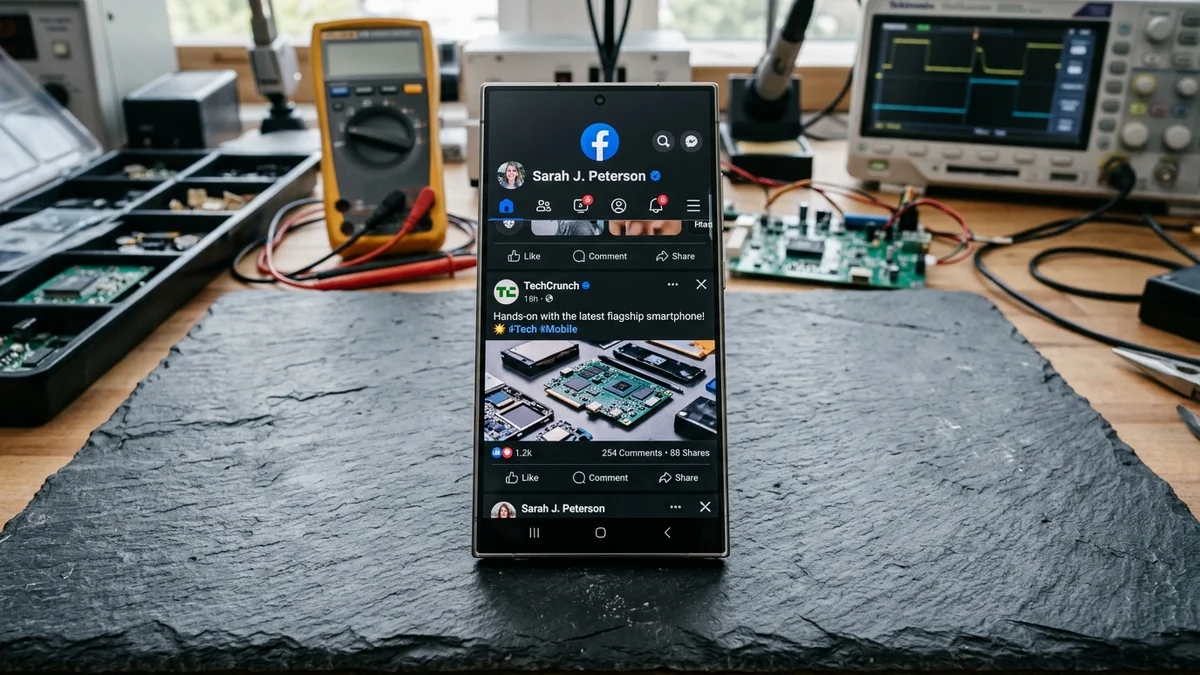
Facebook (com.facebook.katana) remains the world’s most widely used social networking platform. While most users install the app directly through Google Play, millions of Android users frequently need to download and sideload the Facebook APK manually. Common reasons include installing the app on devices without Google Play Services (such as Huawei phones or Amazon Fire tablets), bypassing regional Google Play distribution blocks, or finding a stable legacy version for older Android smartphones and tablets.
Modern builds of the full Facebook app require significant system resources. In 2026, the application easily consumes over 2 GB of storage data and up to 500 MB of active RAM. For older devices running legacy Android versions (such as Android 5.0 Lollipop through Android 9.0 Pie), official Play Store updates have ended. In this guide, we provide verified download links for both the latest 2026 Facebook APK releases and verified legacy versions, show how to enable in-app background updates, and explain why Facebook Lite or open-source web wrappers are often a superior choice for performance.
arm64-v8a)Facebook APK & Facebook Lite Android Compatibility Matrix (2026)
Before you download any APK file, check the minimum Android API level required by that build. Installing an incompatible release triggers the standard Android package parser error: “There was a problem parsing the package.”
Use this compatibility table to select the correct Facebook variant for your operating system and hardware tier:
| Android OS Version & API Level | Recommended Facebook Variant | Architecture / Variant | App Footprint & RAM |
|---|---|---|---|
| Android 14, 15, 16 & 17 (API 34+) | Facebook v584.x+ (2026 Mainline) | arm64-v8a (nodpi) | ~115 MB APK (2+ GB Installed) |
| Android 10, 11, 12 & 13 (API 29 to 33) | Facebook v450.x to v580.x | arm64-v8a / armeabi-v7a | ~95 MB APK (~1.5 GB Data) |
| Android 8.0 & 9.0 (Oreo / Pie, API 26 to 28) | Facebook Lite v440.x (Recommended) | universal (nodpi) | ~2.8 MB APK (<40 MB RAM) |
| Android 6.0 & 7.0 (Marshmallow / Nougat) | Facebook Lite v350.x+ or Katana v200.x | universal / armeabi-v7a | ~2.5 MB APK |
| Android 5.0 to 5.1.1 (Lollipop, API 21 to 22) | Facebook Katana v34.0.0 (Lollipop) | armeabi-v7a (nodpi) | ~37 MB APK (Legacy Branch) |
| Android 4.4 (KitKat, API 19) | Facebook Lite Legacy | universal (Legacy) | ~1.2 MB APK |
Official Facebook APK & Facebook Lite Direct Download Links
To ensure safe installation without malware or altered signatures, always download verified builds signed by Meta Platforms, Inc. Choose the download link below that matches your device tier:
1. Official Facebook APK (2026 Latest Mainline Build)
Recommended for modern Android smartphones and tablets running Android 10 through Android 17 (Samsung One UI, Google Pixel, Xiaomi HyperOS, OnePlus OxygenOS). Full feature set including Reels, Stories, Marketplace, and automatic in-app updates.
2. Official Facebook Lite APK (Latest v440+ Lightweight Edition)
Recommended for budget smartphones, devices with under 4 GB RAM, or devices running Android 8.0 and Android 9.0. Ultra-lightweight (<3 MB download), uses minimal mobile data, and includes integrated messaging without needing a separate Messenger app.
3. Legacy Facebook v34.0.0 APK (Android 5.0 & 5.1 Lollipop Archive)
Targeted archival build for legacy smartphones and tablets running Android 5.0, 5.0.2, and 5.1.1 Lollipop that cannot run modern 64-bit releases.
How to Download & Install the Official Facebook APK Safely
Meta cryptographically signs the official Facebook package (com.facebook.katana) with its hardware-backed developer key. Android verifies this cryptographic signature before allowing any update to install over an existing installation. If any third party tampers with the package, your phone blocks the installation immediately.
- Choose a Verified Mirror: Open APKMirror – Facebook Repository or the official Meta direct server at facebook.com/android. Both sources preserve original SHA-256 signatures and cryptographic certificates from Meta Platforms, Inc.
- Select Standalone APK (Avoid Split Bundles):
- On modern releases such as v584.0.0, repositories list both standard APK files and split BUNDLE (
.apkm) archives. - Always choose the standalone APK variant compiled for
arm64-v8a(oruniversal). This installs cleanly with your phone’s native package installer without requiring secondary split installers. - Enable Unknown Sources: If you are sideloading for the first time on Android 14 through Android 17, follow our complete 2026 Guide to Enabling Unknown Sources & Unlocking Samsung Auto Blocker.
- Install and Launch: Open your downloaded file from your browser downloads or file manager. Tap Install (or Update). Your account login sessions, messages, and settings remain completely intact.
- On modern releases such as v584.0.0, repositories list both standard APK files and split BUNDLE (
How to Enable Facebook In-App Background Updates (No Play Store Required)
One major advantage of sideloading the official Facebook APK is Meta’s built-in background updater service (com.facebook.oxygen). Unlike standard Android apps that depend entirely on Google Play for updates, Facebook can download and install its own app updates directly over Wi-Fi.
To verify that automatic in-app updates are active on your device:
- Open the Facebook app and tap the Menu tab (the three horizontal lines in the top navigation bar).
- Scroll down, tap Settings & privacy, and select Settings.
- Scroll to the Preferences section and tap App updates.
- Ensure the toggle for Auto-update Facebook is switched On.
- Switch on Facebook update available to receive notifications before updates apply.
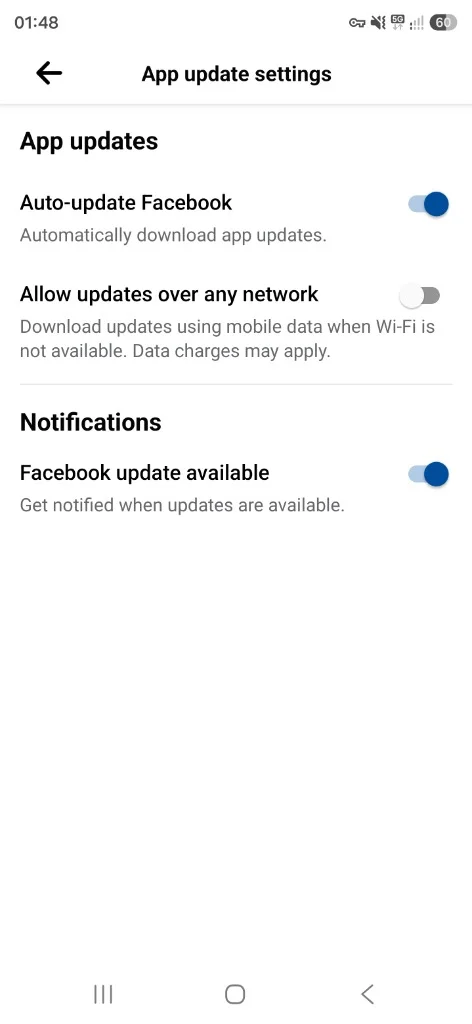
When this toggle is active, Facebook downloads new releases in the background when your phone is connected to Wi-Fi and charging. This guarantees you stay updated even on de-Googled devices lacking Google Play Services.
Why Facebook Lite is Better for Budget Phones & Older Android Devices
If your device runs Android 5.0 Lollipop through Android 9.0 Pie, or if your phone has 4 GB of RAM or less, running the mainline Facebook app creates severe performance bottlenecks. The full application caches extensive media databases locally, consuming gigabytes of internal storage space.
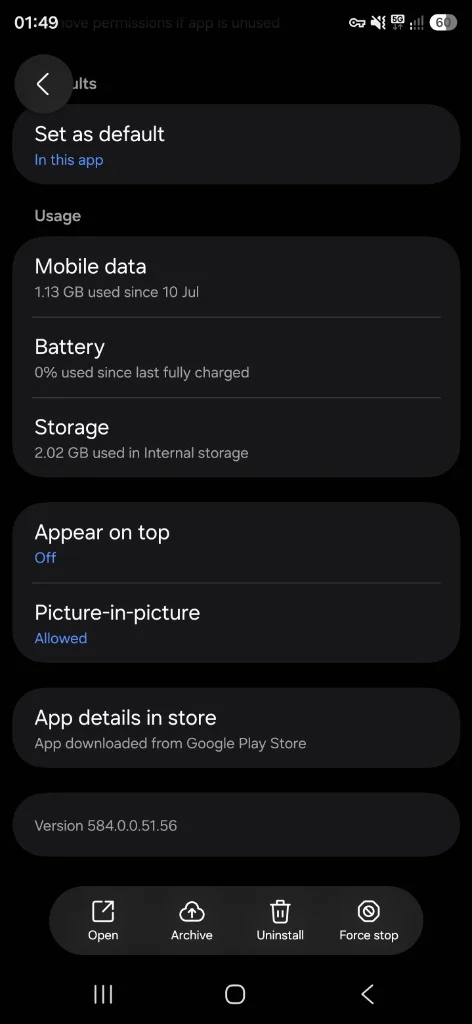
Here is how the official Facebook Lite package (com.facebook.lite) solves these issues:
- Tiny Download Size: Facebook Lite is under 3 MB, compared to 115 MB for the mainline installer.
- Minimal RAM Footprint: Lite runs comfortably using 25 MB to 45 MB of active RAM. The standard app routinely consumes 350 MB to 500 MB.
- Optimized for 2G and 3G Networks: Lite offloads media rendering and compression to server-side infrastructure, reducing mobile data consumption by up to 70%.
- Built-In Messenger: Facebook Lite retains basic direct messaging functionality inside the app, eliminating the need to install a separate 150 MB Messenger APK.
You can download the verified Facebook Lite APK directly from official mirrors, or grab the official Facebook APK. Both packages can even be installed side by side on the same device.
Privacy-First Open-Source Facebook Alternatives (2026)
If you want to access your Facebook feed without granting Meta background permissions, continuous location tracking, or telemetry access, several privacy-focused alternatives exist:
- SlimSocial for Facebook (F-Droid): Featured in our 2026 Open-Source Android App Stack. SlimSocial is an open-source, lightweight web wrapper. It has zero tracking code, requires zero intrusive permissions, and weighs less than 1 MB.
- Nobook (F-Droid): A modern, privacy-focused open-source Facebook and Messenger web wrapper that isolates Facebook cookies, blocks sponsored feed tracking, and supports custom user scripts without background battery drain.
- Isolated Web Progressive Web App (PWA): Open your secure browser (such as Cromite or IronFox) and navigate to
touch.facebook.com. Tap the browser menu and select Add to Home screen. This runs Facebook inside an isolated sandbox without native device access. - Sandboxed Google Play & MicroG: If you run a custom ROM and want full push notifications without Google tracking, review our 2026 Sandboxed Play Services & MicroG Playbook.
For automated, open-source APK management without risky mirror sites, install Droid-ify as your F-Droid client and enable silent background updates using our Shizuku wireless debugging setup guide.
Troubleshooting Common Facebook APK Installation & Crash Errors
If you encounter errors during installation or the app closes immediately after launch, follow this diagnostic sequence:
“App Not Installed
Package Conflicted with an Existing Package”:
- This error occurs when your phone has a pre-installed factory build of Facebook (often placed on system partitions by OEMs like Samsung or carrier bloatware).
Facebook Crashes on Android 5.0 or 5.1 Lollipop
- Modern Facebook builds require Android 10+. If you are running an older device, download the archival Facebook v34.0.0 APK for Android 5.0 Lollipop.
Clear App Cache and Corrupted Local Data
- If Facebook freezes on login, go to Settings → Apps → Facebook → Storage. Tap Clear cache, then tap Clear data. This resets the local database without affecting your cloud profile.
Frequently Asked Questions (FAQ)
Is downloading the Facebook APK safe for my Android device?
Yes, provided you download unmodified APK files signed by Meta Platforms, Inc. Android’s internal package manager checks the cryptographic certificate on the APK against Meta’s official public key. Never download modified APKs claiming to offer “unlimited credits” or “free VIP features”, as these frequently bundle malware.
Will sideloaded Facebook APKs update automatically?
Yes. As demonstrated above, Facebook includes an internal app updater service. As long as you keep Auto-update Facebook enabled inside App Update Settings, the app will download and apply new releases over Wi-Fi without requiring Google Play Store access.
How do I restore the Google Play Store if it is missing?
If you prefer using Google Play rather than manual sideloading, follow our comprehensive tutorial on How to Download & Update Google Play Store APK to restore the official store on your phone or tablet.
Final Thoughts
Sideloading the Facebook APK gives you full control over your social media client. Whether you run the latest v584.x mainline build on modern hardware, switch to Facebook Lite for a fast and lightweight experience, or install a verified legacy version on an older Android 5.0 tablet, managing your setup takes only a few taps.
Want to optimize your Android experience even further? Explore our guides on auto-updating apps directly with Obtainium APK, blocking tracking with our 2026 Open-Source Android App Stack, or removing OEM bloatware without PC or root access.